
Skip to content
Atomation
Platform
OverviewDashboard, finding queue, evidence, and reports.Product modelConnection, snapshot, finding, and report output.Evidence & reportsSource trails, screenshots, exports, and report views.
Trust & coverage
What we checkRepresentative checks plus assessment trust model.Feature postureWhich Okta features are on, off, and worth enabling.Security modelRead-only scans, exact connector grants, no remediation.DeploymentHosted Atomation workspace model, partner portals, and assessment boundaries.
See it liveOkta Assessment demoWalk a real finding queue, evidence drawers, and reports — no signup, open demo.Explore the live demo
SolutionsDocsPartnersPricingLive demoDemoContact usContact
Product
Product overview
PlatformOverviewProduct modelEvidence & reports
Trust & coverageWhat we checkFeature postureSecurity modelDeployment
SolutionsDocsPartnersPricingLive demoContact usCall 727-999-1813
Okta Assessment / Coverage

Coverage that follows how Okta risk actually shows up.

The assessment reviews people, access, apps, policies, service credentials, alert visibility, evidence quality, and licensing signals as connected posture data.
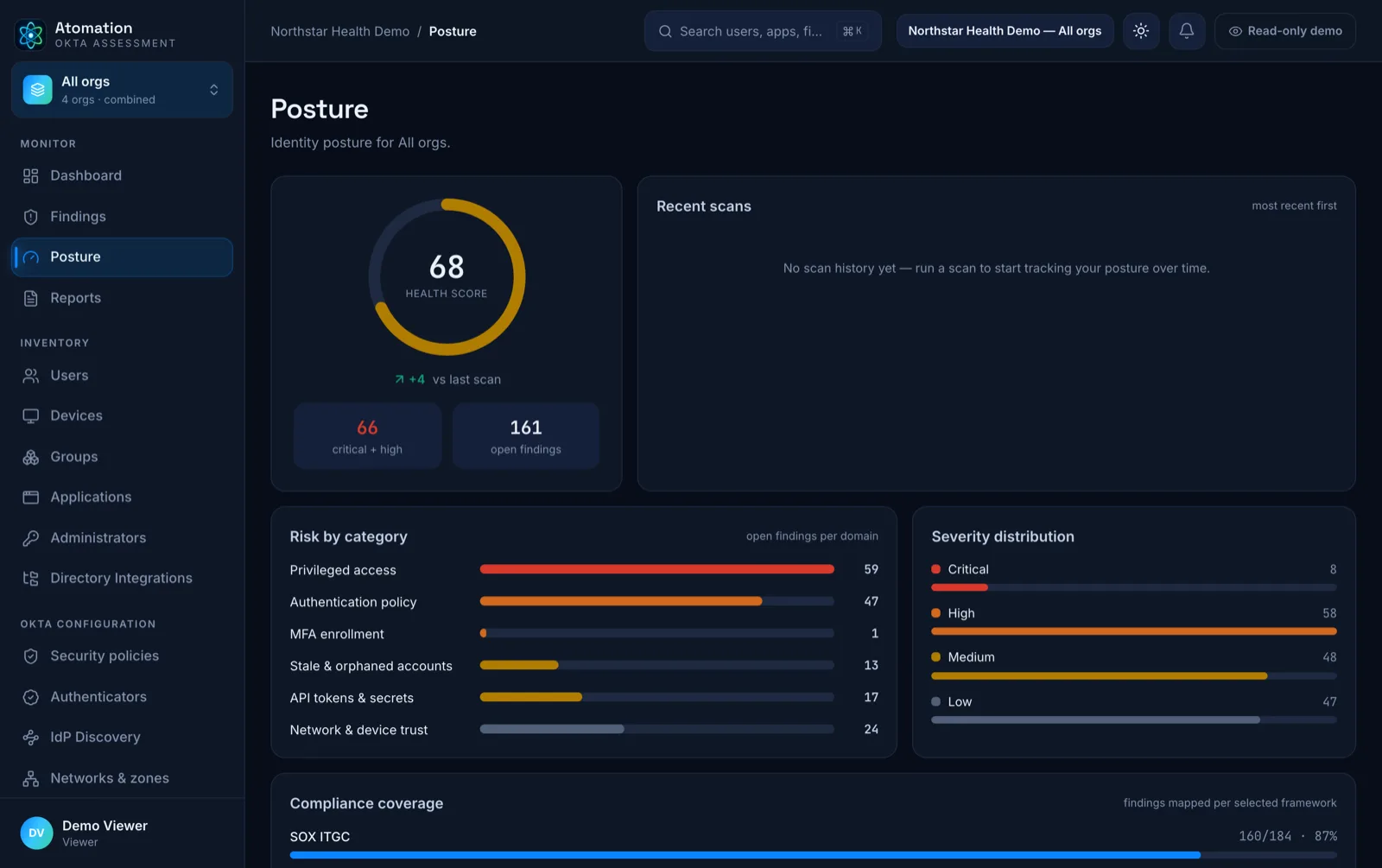
Privileged accessPolicy postureService appsAlert coverageLicensing
Atomation posture — Okta security posture by category with snapshot inventory
Signal groupAccessAdmins, roles, group sprawl, stale users, sensitive apps.
Signal groupPolicyMFA, assurance, exceptions, overlap, and high-value app coverage.
Signal groupEvidenceLog-stream configuration, customer-supplied monitoring evidence, reports, mappings, and licensing signals.
Representative areas

Review categories stay scan-friendly.

Public pages show the assessment shape while scoped reviews go deeper into the customer org.

Coverage area

Administrators and privileged access

Administrators and privileged access

Privileged access is where small Okta mistakes become major exposure.

  • Super Admin exposure
  • Admin role drift
  • Powerful service-app access
Coverage area

Access model and lifecycle posture

Access model and lifecycle posture

Review stale access, group sprawl, and sensitive app assignments.

  • Stale access signals
  • Group and assignment sprawl
  • Sensitive app access review
Coverage area

Authentication and policy posture

Authentication and policy posture

Check policy coverage, MFA posture, exceptions, and assurance levels.

  • Policy coverage gaps
  • Exception and overlap review
  • Admin and high-value app assurance
Coverage area

API tokens, service apps, and integrations

API tokens, service apps, and integrations

Non-human access, integration access, and service credentials are reviewed for ownership, privilege, and hygiene.

  • Ownership and privilege review
  • Stale or concentrated access
  • Integration hygiene
Coverage area

Alerting, evidence, and compliance support

Alerting, evidence, and compliance support

Review log-stream configuration and customer-supplied monitoring evidence without claiming raw System Log collection.

  • Log-stream configuration
  • Customer-supplied alert evidence
  • Framework and control mapping
Coverage area

Licensing and utilization signals

Licensing and utilization signals

Surface renewal and cost questions tied to observed usage.

  • Utilization patterns
  • Stale entitlement signals
  • Renewal planning context
Coverage area

Feature posture and utilization

Feature posture and utilization

Read the org's actual feature list and flag what is worth turning on.

  • Feature inventory (on, off, available)
  • Security hardening left switched off
  • Versioned guidance reviewed with each rule release
Feature posture

Okta keeps shipping features. The scan keeps score.

Every org's feature list is different. Atomation reads yours on every scan and shows what is available, what is on, and which security options are worth enabling — including hardening that ships with your org and is simply switched off, and controls that are enabled but that your users never actually enrolled in.

See feature posture
Feature postureYour org · this scan
  • Okta Verify number matchingSecurityEnabled
  • Phishing-resistant authenticationSecurityWorth enabling
  • CAPTCHA on sign-inSecurityWorth enabling
  • Self-service recovery optionsEnd-userReview for your org
FastPass enrollment
62%
Grouped across 7 areas · guidance refreshes on every scan
Evidence and reporting

A check is only useful when the proof travels with it.

Findings are designed to carry source context, affected scope, owner review, report language, PDF or Markdown report output, and supported inventory CSV data from the same point-in-time assessment.

See evidence model
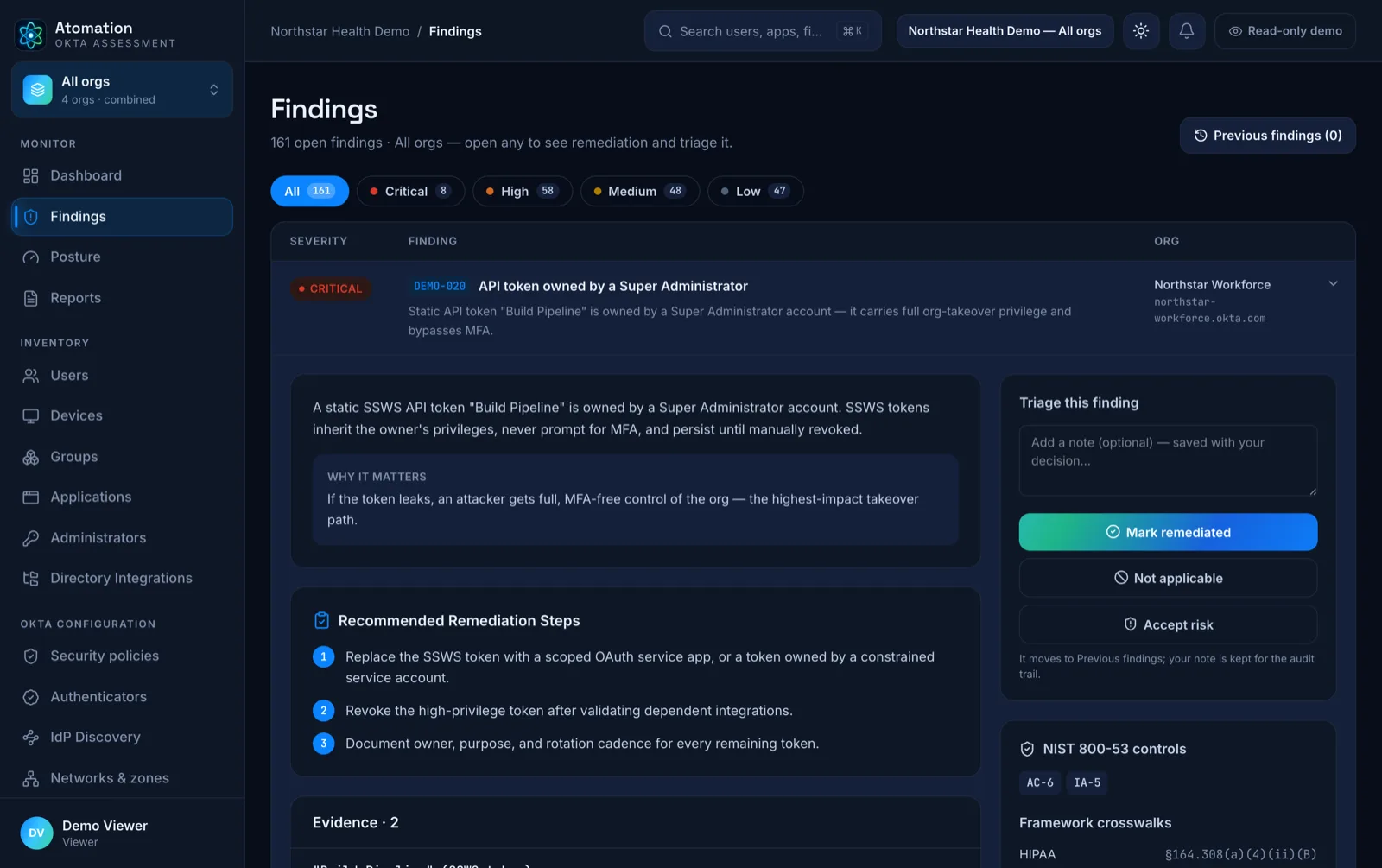
Atomation finding detail — remediation steps, triage, NIST controls, and framework crosswalks
Atomation

Okta posture and evidence without changing your tenant. Find access risk and evidence gaps before audit week.

Veteran owned — securing Okta orgsBuilt for Okta Identity Engine
[email protected]727-999-1813
ProductOverviewHow it worksPricingLive demo
ResourcesDocumentationFrameworksSecurity & privacyBlogOkta setupFAQ
CompanySolutionsPartnersAboutContact
LegalPrivacyTermsData retentionSubprocessorsAccessibility
© 2026 Atomation LLC · atomation.io
LinkedInInstagramFacebook